Choose another country or region to see content specific to your location.

Product at a glance

Our smart-capable immersion heater control

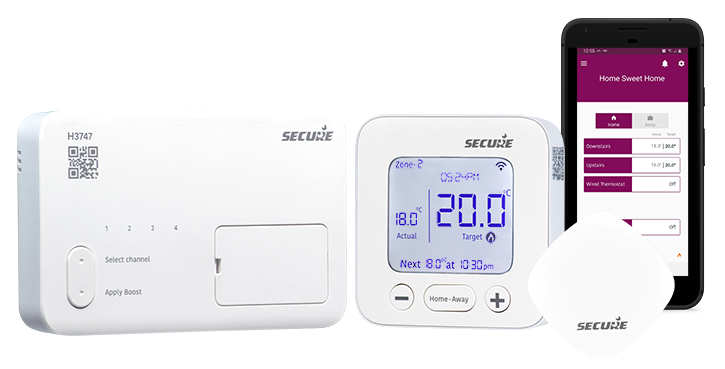
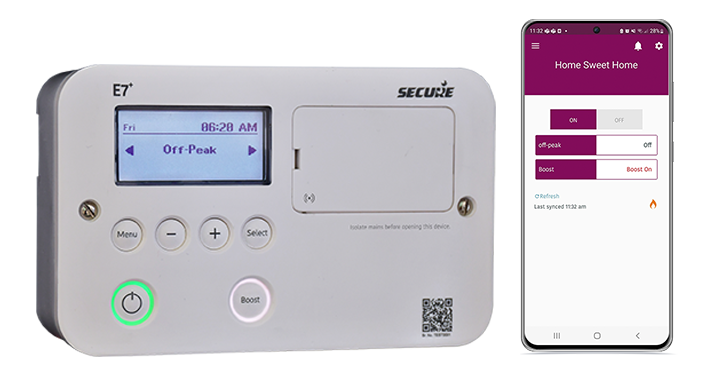
The new E7+ from Secure is the latest version of the Electronic 7 water heater controller. E7+ is designed to control one or two 3kW immersion heaters. It can also be programmed locally to provide a full tank of hot water whenever required during off-peak electricity periods. Each heater can be programmed separately for maximum energy saving and control. Designed to be the successor to both the Electronic 7 and the Economy 7 Quartz, it is easy to install or retrofit. Now with a new compact interface that is perfect for newer installations, as well as an adaptor plate, which allows fresh installations to be more ergonomic and streamlined, whilst still making the E7+ a plug-in replacement for all the existing legacy water heaters from Horstmann. The E7+ can be controlled by the Secure Bluetooth-enabled app, within a property, and there is an optional plugin Wi-Fi adaptor that will turn the E7+ into a truly smart unit you can control from anywhere. This app is also used by our range of smart-capable programmable thermostats - C1727 and H3747.

Application

  • Suitable for use with single, dual, or twin element immersion heaters

Benefits

  • Easy to retrofit using the provided adaptor plate and fully interchangeable with all Horstmann/Secure Economy 7 controllers
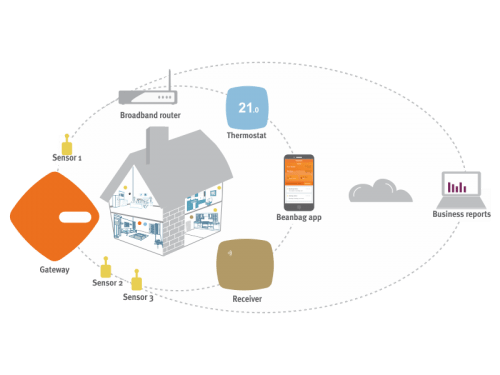
  • No Wi-Fi necessary for local control of hot water via app using Bluetooth
  • New streamlined compact design
  • Easy to upgrade to full smart (remote) control using Wi-Fi adaptor
  • Uses the same app as the C1727 and H3747 smart-capable programmable thermostats
  • Safety against configuration change
  • 7 year no quibble warranty

Features

  • Bluetooth-enabled app for local control (Android and IOS)
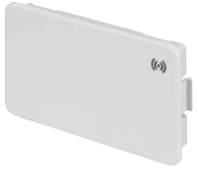
  • Full smart control from anywhere with optional Wi-Fi adaptor that does not need a hub or gateway
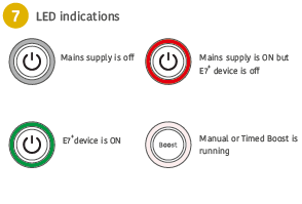
  • Manual Boost button - ideal for 30 minutes, 1, or 2-hour top up without changing the set program
  • Programmable boost - can be programmed so that it will heat only a small part of your tank at a set time each day
  • Electronic on/off switch
  • Measures estimated energy consumed for boost and off-peak in kWh via the app
  • Includes 7-day programmer with 3 On Offs straight from the device

Specification

Electrical
Contact rating 13 Amps 230V AC Suitable for immersion heaters up to 3kw
Contact type Micro-disconnection on control, disconnection to immersion heaters on double-pole rocker switch
Supply 230V 50Hz
Environmental
Pollution degree Degree 2 normal situations
Moisture protection Ordinary
Enclosure protection IP30
Features
Shock protection Class 1
Live parts Enclosed
Operating temperature range 0°c to 35°C
Battery reserve Approximately 2 years total power disconnection
Clock am/pm Indication Winter/Summer indication
Programme options Full 7-day programmming; Off-peak & Boost, up to three time periods each; Boost – programmable automatic boost and 1/2, 1, and 2-hour manual boosts
Mechanical
Dimensions 170 x 115 x 60mm (excluding rocker switch)
Radio
Compliance Bluetooth BLE compliant
Operating frequency 2.4 GHZ
RF range ~60m, line of sight
Compliance
Product Standard/Safety : BSEN / EN 60730-1, BSEN / EN 60730-2-7
RED Radio: ETSI EN 300 328 RED EMC: ETSI EN 301 489-1, ETSI EN 301 489-17, BS EN 60730-2-7

Installation Videos

E7+ Retrofit installation

This video familiarises you with the retrofitting of the new E7+ device in place of the existing Electronic 7 or Economy 7 quartz. It has an adapter plate to make retrofitting simple plug-and-play.

E7+ new installation

This video familiarises you with the installation of a new E7+ device.The E7+ is designed to control single or twin immersion heating load up to 3 kW, utilising off-peak electricity tariffs to provide a full tank of hot water as per your preference.

Introducing the new E7+

FAQs

Make sure GMT/BST mode is enabled by following the steps below:

  1. Press Menu
  2. Press + until Settings is displayed, then press Select
  3. Press + until GMT/BST is displayed, then press Select
  4. If ‘Enable’ is shown, press select to enable GMT/BST mode

The Off-Peak schedule refers to the times you can programme for off-peak operation. You can set three separate ‘On / off’ times, six periods throughout the day.
By default, the Off-Peak schedule is set to ‘On’ from 02:15 AM to 07:15 AM daily, ensuring a full tank of hot water in the morning.
All six periods can be changed using the following instruction:

  1. On the E7+, press Menu
  2. Select ‘Off-Peak’
  3. Then, choose ‘Monday’
  4. Select Period 1, then set the hour using +. Press Select to set the minutes, then press Select again to set the status
  5. Repeat this process for each subsequent period
  6. After setting Period 6, you will be asked if you want to ‘Copy schedule’
  7. If you select yes, use + to choose the days to copy the schedule to, then press Select to confirm.
  8. The screen will display ‘Schedule copied’ once the schedule has been successfully saved.

The E7+ has a maximum output of 3 kW. The Boost function uses the same 3 kW of power as the Off-Peak setting, so both cannot operate at the same time.
You can schedule Boost in a similar way to the Off-Peak schedule by:

  1. Accessing Menu
  2. Selecting ‘Boost’
  3. setting the ‘On’ and ‘Off’ times for Period 1 and Period 2 respectively

You can also press the Boost button on the unit to apply Boost for up to 2 hours.

First, try to resolve the issue by logging out of the app and then logging back in using your email address and password.
If the issue persists, follow the steps below.
For all Users (connecting over Bluetooth):

  1. Delete the app, turn off the phone, and power cycle the reciever.
  2. Restart the phone and download ‘Secure Controls’ app again.
  3. On your phone, go to Settings → Secure Controls and ensure that the mobile data is on and all permissions are enabled (set to On), including:
    • Location (On while using the App)
    • Bluetooth
    • Camera
    • Background app refresh

    The App will not be able to connect if any required permissions are disabled.

  4. Open the app, sign into your account, tap the three-line menu in the top-left corner, and select Add new system
  5. Scan the QR code on the front of the receiver (wired to the heating system). Press and hold the Menu button on the receiver for 8 seconds until “Commissioning” is displayed on the E7+ screen.
  6. Follow the in-app instructions, selecting No when asked to ‘Retain users’, and wait for your system to appear.

If you are using Bluetooth only, or if your phone is too far from the receiver, try moving closer. The receiver range should cover most homes and multiple floors; however, placement inside a cupboard or near thick walls can reduce signal strength.
Upgrading to Wi-Fi removes this limitation, as the system will always use Wi-Fi when available.

Connecting over Wi-Fi (with the optional Secure HC 2.4 WIFI Extender):

Note: If you are installing the Wi-Fi extender, please power down the receiver before doing so.

  1. If you are receiving a “Cannot establish communication” message with the Wi-Fi card in-stalled, or the system is not connecting when outside the home / Bluetooth range, follow the steps below.
    • Ensure you have a 2.4 GHz router, or a dual-band router with a separate 2.4 GHz channel, or temporarily disable the 5 GHz band.
    • The Secure Wi-Fi Extender only connects to 2.4 GHz Wi-Fi channels. Some routers use 5 GHz only.
    • If you are unsure whether your router supports 2.4 GHz, contact your Wi-Fi provider. They can confirm this and, if required, split the dual bands into two separate SSIDs (network names) or temporarily disable the 5 GHz band.
  2. Once confirmed, connect your phone to the 2.4 GHz Wi-Fi network before attempting to pair it with the receiver.
  3. Once completed, if not already prompted, go to the Settings (cog icon) in the top-right cor-ner of the app and select Wi-Fi settings.
  4. Enter your Wi-Fi password and wait for the message “Wi-Fi credentials have been sent to device.”

You will then be able to control and programme your receiver from outside the home.
If issues persist, tap the three-line menu in the top-left corner, select ‘Help and support’, then ‘Send error logs’, and include a brief message describing the issue. Technical support will investigate fur-ther.

The lock symbol indicates that the Tamper-Proof Programme is active. This security feature is commonly used by landlords to prevent unauthorised changes to the settings.
To lock or unlock the screen, press and hold the Menu and + buttons simultaneously for 5 seconds.